3D printing buying guide
Best 3D Printer Filament Dryers: Do You Really Need One?
3D printer filament is hygroscopic — it slowly absorbs water molecules from the surrounding air. When wet filament passes through a 200°C+ hotend, that trapped moisture flash-boils into steam, creating microscopic pressure spikes, surface pop marks, stringing, and weak layer adhesion.
However, not every 3D printer owner needs an expensive active drying appliance immediately. A maker printing basic PLA in a desert environment or sealed desiccant box may go years without moisture issues. Conversely, anyone working with PETG, TPU, or Nylon in humid ambient air will discover that drying filament is often the difference between clean prints and frustrating failures.
This independent buying guide explains how active heated drying differs from passive dry storage, which materials demand drying, how to evaluate dryer capacity and specifications without overspending, and which verified models match different workshop workflows.
Quick Answer: Do You Need a Filament Dryer?
Before buying equipment, evaluate your specific filaments, ambient humidity, and print quality goals using this decision framework:
PLA users in low/moderate humidity
Dryer usually optional to startPLA absorbs moisture relatively slowly compared to engineering polymers. Storing spools in sealed bags or airtight containers with active desiccant keeps fresh filament in good condition.
PETG printers
Dryer recommended if ambient humidity is >45%PETG is moderately hygroscopic. Wet PETG causes severe stringing, web-like oozing, and cloudy surface artifacts that cannot be tuned out with slicer retract settings alone.
TPU / Flexible filament users
Active drying strongly recommendedFlexible TPU absorbs ambient moisture within days of exposure. Wet TPU causes bubbling, steam pop marks, poor surface finish, and nozzle clogging.
Nylon (PA), PC, and Soluble Supports (PVA)
Active dryer essentialPolyamide (Nylon) and PVA absorb water rapidly — sometimes within hours of unsealing. Printing without pre-drying and active feeding from a dry enclosure leads to failed prints.
What Does Moisture Do to 3D Printer Filament?
Polymers absorb water at the molecular level. When heated inside the melt zone of a hotend, water turns to steam and expands roughly 1,600 times in volume, creating physical defects:
As the steam expands at the nozzle tip, it disrupts the uniform flow of molten plastic. This produces audible crackling or popping noises during extrusion, leaves visible pockmarks on outer perimeters, and causes uncontrollable stringing across open gaps.
Beyond cosmetic surface flaws, moisture degraded filament suffers from lower tensile strength and poor inter-layer bonding. The trapped steam leaves microscopic voids within the extruded bead, weakening functional structural parts.
It is important to remember that these visual symptoms — stringing, blobs, rough surfaces — can also be caused by incorrect hotend temperature, poor retraction settings, or hotend heat creep. Do not automatically assume every print flaw stems from moisture without systematic troubleshooting.
Symptoms of wet filament
- Audible popping, crackling, or hissing sounds at the nozzle during extrusion
- Excessive fine stringing or hairy oozing between print towers
- Pockmarks, small voids, or rough pimpled surface finish on perimeter walls
- Brittle, snap-prone filament before it even enters the extruder feed drive
- Inconsistent layer adhesion and reduced part mechanical strength
Troubleshooting checklist
- Check if filament crackles when manually extruding into open air.
- Inspect spool condition — brand-new vacuum bags can occasionally have micro-punctures.
- Confirm slicer retraction settings and hotend temperature match manufacturer specs before blaming moisture.
Filament Dryer vs Dry Box vs Sealed Storage
A common point of confusion is treating passive storage solutions as active dryers. It is vital to separate devices that remove moisture from containers that prevent moisture absorption:
| Solution | Primary Purpose | Uses Heat | Main Advantage | Main Limitation | Best-Fit User |
|---|---|---|---|---|---|
| Heated Filament Dryer | Active moisture extraction | Yes (Controlled PTC/Resistance) | Dries wet spools in hours; allows print-while-drying | Requires power; higher purchase cost | PETG, TPU, Nylon users & humid environments |
| Passive Dry Box | Desiccant humidity control | No | Keeps dry filament dry for weeks while printing | Cannot remove moisture already absorbed inside plastic | PLA & PETG stored in sealed environments |
| Sealed Storage Container | Bulk passive storage | No | Low cost per spool; protects large inventories | No print-while-feeding capability unless modified | General spool storage between projects |
| Vacuum Storage Bag | Individual spool isolation | No | Extremely compact; inexpensive; space-saving | Bag seals wear over time; manual pump process | Infrequently used specialty filaments |
| Integrated Printer System | Automated feeding & climate control | Varies by model | Seamless slicer integration & automated switching | Proprietary eco-system; higher cost | Multi-color & high-throughput automated workflows |
Passive containers with desiccant and a digital hygrometer maintain low relative humidity (<20% RH), but desiccant alone lacks the thermal energy required to release moisture bound inside deep polymer layers.
Which Filaments Need Drying?
Polymers vary dramatically in their rate of moisture absorption. The table below outlines material characteristics and recommended storage practices:
| Material | Moisture Sensitivity | When Drying Helps | Storage Considerations |
|---|---|---|---|
| PLA | Low to Moderate | High humidity environments or spools left exposed for months | Keep sealed with desiccant; dry at ~45°C–50°C if stringing occurs |
| PETG | Moderate | Whenever oozing, severe stringing, or cloudy finish appears | Store in airtight dry boxes; dry at ~60°C–65°C for 4–6 hours |
| TPU / TPE | High | Before almost every major print in humid climates | Extremely hygroscopic; dry at ~55°C–60°C and feed directly while drying |
| ABS / ASA | Moderate | When layer bonding suffers or surface bubbles develop | Store sealed; dry at ~60°C–70°C for 4–6 hours |
| Nylon (PA / PA-CF) | Very High | Always — dry before printing and feed continuously from dryer | Absorbs water rapidly; dry at 70°C+ for 8–12 hours before printing |
| Polycarbonate (PC) | High | Whenever steam popping occurs or structural clarity drops | Requires high-temperature drying (~70°C) and sealed storage |
| PVA (Soluble Support) | Extremely High | Required — wet PVA soft-jams extruders and turns sticky | Keep sealed in airtight containers with fresh desiccant at all times |
Drying temperatures and recommended durations depend on polymer formulation, spool structure, and manufacturer technical datasheets. Always verify your specific spool's thermal limits to prevent deforming the plastic reel.
What to Look for in a Filament Dryer
When shopping for a dedicated filament dryer, evaluate these key technical specifications:
Maximum Temperature & Thermal Control
Basic dryers cap out around 50°C (suitable for PLA and PETG). Advanced models reach 70°C or higher, which is necessary for Nylon, PC, and engineering composites.
Air Circulation & Ventilation Design
Heated air alone is inefficient without active fan circulation. Look for fan-assisted designs with exhaust vents to carry moisture out of the chamber rather than trapping humid air around the spool.
Spool Capacity & Physical Clearance
Verify internal dimensions. Standard 1kg spools are ~200mm in diameter and 65–75mm wide. Multi-spool dryers should fit wider or cardboard reels without binding.
Print-While-Drying Support
Ensure the chassis features smooth PTFE outlet ports, internal roller bearings, and low friction paths so the extruder can pull filament directly during active drying.
Humidity & Temperature Monitoring
Digital displays showing real-time chamber temperature and relative humidity (RH%) help verify that moisture is actively evacuating.
Safety Features & Auto-Shutoff
Look for thermal cut-off fuses, timer controls, and recognized electrical safety certifications (UL, CE, FCC) for peace of mind during multi-hour drying cycles.
Single-Spool vs Multi-Spool Filament Dryers
Choosing between a compact single-spool unit and a multi-spool dryer depends on your workspace footprint, budget, and print workflow:
Single-spool dryers feature a small footprint, lower power consumption, and affordable pricing. They are ideal for makers who print primarily with one material at a time or occasionally need to prep a single spool of PETG or TPU.
Multi-spool dryers (two or four spools) shine in high-throughput workshops, multi-color setups, or farm environments. They allow you to dry backup spools while actively feeding the printer, saving hours of prep time when switching materials.
Filament Dryers Worth Comparing
The following verified products represent current, reputable options across single-spool, two-spool, and multi-spool categories based on manufacturer specifications and documented features:
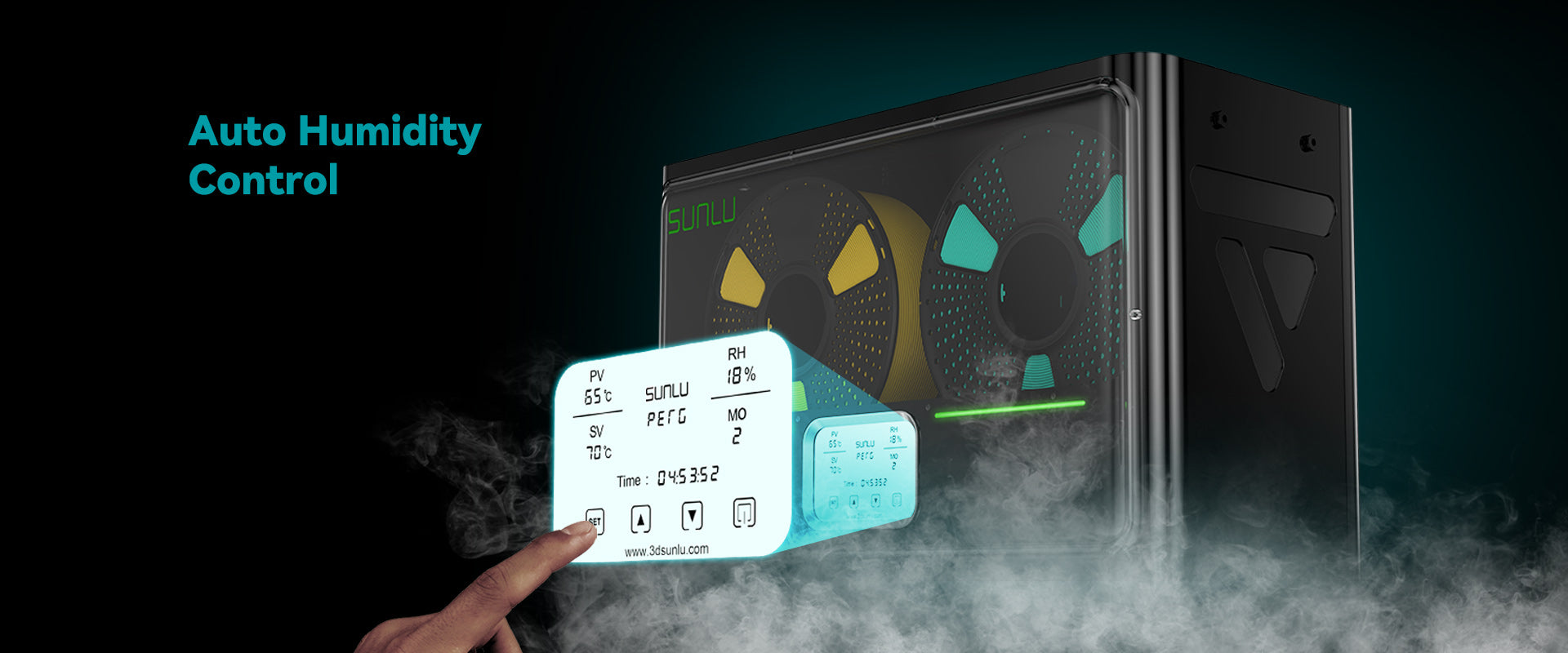
4 Spools (4 × 1kg standard spools)
SUNLU FilaDryer S4
Temperature Range: Up to 70°C (Preset modes for PLA, PETG, TPU, ABS, PA, PC)
Spool Compatibility: Fits spools up to 200mm diameter × 70mm width (4 reels)
Key Features
- 330W PTC heating element with 3 active circulation fans for fast surround heating
- Automatic humidity control system with real-time digital RH% & temperature display
- 8 filament feed outlets with PTFE tubing for versatile multi-printer feeding
- Triple safety protection: thermal switch, software cutoff, and internal safety fuse
Limitations
- Larger desk footprint (458mm × 218mm × 312mm)
- Higher initial power draw during rapid warm-up
Best fit: Multi-printer workshops, print farms, and high-volume engineering material users
Multi-spool class
View at SUNLU
1 Spool (1 × 1kg spool)
SUNLU FilaDryer S2
Temperature Range: 35°C to 70°C adjustable
Spool Compatibility: Fits standard 1kg spools up to 210mm diameter × 85mm width
Key Features
- 360° surround heating with upper and lower curved heating plates
- Large touch-screen LCD display with material presets (PLA, PETG, TPU, ABS, PA, PC)
- Top filament outlet port for smooth direct printing while drying
- Compact vertical design ideal for tight desk spaces
Limitations
- Single-spool capacity requires drying spools sequentially
- Humidity sensor displays chamber RH% but does not auto-purge air
Best fit: Hobbyists and solo makers needing a compact, capable single-spool dryer for TPU or PETG
Compact single-spool class
View at SUNLUModular 1 Spool per box (Expandable with extra storage boxes)
Polymaker PolyDryer
Temperature Range: 3 Power levels (Preset up to ~70°C)
Spool Compatibility: Fits standard 1kg spools (up to 205mm diameter × 75mm width)
Key Features
- Modular architecture separating the heating dock from airtight storage boxes
- High-efficiency 360° airflow fan circulation inside the drying dock
- PolyDryer Box features silicone seals, desiccant compartment, and built-in hygrometer
- Enables drying a spool and then storing it long-term without removing it from its container
Limitations
- Drying dock dries one box at a time
- Additional storage boxes must be purchased separately for large inventories
Best fit: Makers wanting a clean modular system that integrates active drying with long-term sealed storage
Modular system class
View at PolymakerDryer Comparison Table
A quick side-by-side technical reference comparing verified dryer models:
| Model | Spool Capacity | Temperature Range | Print-While-Drying | Main Advantage | Main Limitation |
|---|---|---|---|---|---|
| SUNLU FilaDryer S4 | 4 Spools (4kg total) | Up to 70°C | Yes (8 PTFE Outlets) | High 4-spool capacity, 330W PTC heating & auto humidity control | Larger bench footprint |
| SUNLU FilaDryer S2 | 1 Spool (1kg) | 35°C–70°C | Yes (Top Outlet) | 360° surround heating, touch presets & compact footprint | Single spool throughput |
| Polymaker PolyDryer | 1 Spool per box (Modular) | 3 Levels (Up to ~70°C) | Yes (Sealed Box Outlet) | Modular dock design; leaves spool sealed in dry box post-drying | Dock dries one box at a time |
Can You Print Directly From a Filament Dryer?
Yes. Most quality heated dryers and dry boxes are specifically designed to feed filament directly to your 3D printer while actively running:
Extruding directly from a dryer is essential for extremely hygroscopic materials like Nylon and PVA. These filaments absorb moisture so rapidly that even during a 6-hour print, exposed filament outside a enclosure can absorb enough water to cause quality degradation halfway through the job.
To set up print-while-drying, connect a length of PTFE Bowden tubing from the dryer's outlet port directly to your printer's extruder inlet. Ensure the tubing path is smooth without sharp bends to minimize friction drag on the extruder motor.
How Much Should You Spend?
Evaluate your budget based on your actual material requirements rather than buying top-tier equipment specs unnecessarily:
- Basic Passive Storage ($15 – $30) (Sealed storage containers, vacuum bags, and loose desiccant): Keeps already-dry PLA and PETG in good condition. Zero ongoing power cost.
- Entry Single-Spool Dryer ($40 – $70) (Dedicated heated 1-spool units with fan circulation): Active drying for PETG, TPU, and ABS. Excellent value for individual hobbyists.
- Multi-Spool & Modular Dryers ($120 – $180) (4-spool capacity dryers or modular dock systems): High throughput, auto humidity control, 70°C capability for Nylon & engineering polymers.
Common Filament Drying Mistakes
Avoid these ten frequent pitfalls when drying 3D printing filament:
1. Assuming all filament requires identical drying
Drying PLA at 70°C will soften the plastic and fuse the spool into a solid lump.
2. Exceeding spool thermal limits
Inexpensive plastic or cardboard spools can warp or collapse if exposed to excessive heat.
3. Confusing passive dry boxes with active dryers
Desiccant preserves dry filament but cannot drive absorbed water out of wet spools without heat.
4. Assuming a low humidity display means the spool is dry
Air inside the chamber dries faster than water trapped deep inside core plastic layers.
5. Purchasing a dryer that cannot fit your spool dimensions
Always measure spool width and diameter before buying, especially for 2kg or cardboard reels.
6. Leaving dried filament exposed to humid room air
Nylon can absorb performance-degrading moisture in as little as 30–60 minutes of room exposure.
7. Using food appliances (ovens/dehydrators) carelessly
Kitchen food dehydrators lack precise thermal control and introduce potential chemical cross-contamination.
8. Treating dryer recommendations as absolute rules
Ambient room temperature and starting moisture level alter the required drying time.
9. Assuming every print flaw stems from wet filament
Rule out nozzle clogs, loose belts, heat creep, and slicer settings before blaming water.
10. Buying expensive equipment before proving a need
If your PLA and PETG print cleanly from simple sealed bags, spend your budget on filament instead.
Filament Drying Safety
Operating heating appliances requires basic safety precautions to protect your workshop:
- Never use microwaves or uncontrolled kitchen appliances to dry filament — extreme overheating can melt spools, release fumes, or cause fire hazards.
- Do not use kitchen food-preparation appliances for technical polymers without proper safety assessment.
- Ensure dryers operate on flat, clear, non-flammable surfaces with adequate ventilation space around intake fan ports.
- Always follow manufacturer temperature limits for both the dryer appliance and the specific filament spool.
- Verify that your dryer features automatic thermal overload protection and electrical safety certifications.
Overheating spools past their glass transition temperature (Tg) causes filament to soften, expand, and fuse together on the roll, rendering the spool permanently unusable.
Filament Dryer Buying Checklist
Run through these final questions before selecting a dryer:
- Which filament materials do I print most frequently?
- Am I experiencing confirmed moisture symptoms (popping sound, extreme stringing)?
- What is the average relative humidity in my printing workspace?
- Do I need active heated drying or simply sealed desiccant storage?
- How many spools do I need to dry simultaneously?
- Will my specific spool diameters and reel widths fit inside the unit?
- Do I need to feed filament directly to my printer during drying?
- Does the dryer reach the required temperature for my highest-temp material (e.g. 70°C for Nylon)?
- Is the physical footprint manageable on my workbench?
- Is the purchase justified by my actual printing frequency and material requirements?
Final Recommendation
Filament dryers are problem-solving tools, not compulsory printer accessories. If you print primarily with PLA in favorable climate conditions, simple sealed storage bags with fresh desiccant are often all you need.
However, if you print PETG, TPU, or Nylon — or live in a high-humidity environment — an active heated filament dryer is one of the most effective investments you can make to eliminate mysterious print failures and achieve consistent, professional results.
Start by assessing your actual material requirements, choose a capacity that fits your workflow, and follow documented manufacturer drying guidelines to protect your filament investment.
Frequently Asked Questions
Continue Reading
- 3D Printing hub — all 3D printing guides →
- 3D Printer Accessories: What You Actually Need →
- How Much Does a 3D Printer Cost? →
- FDM vs Resin 3D Printing: Which Is Right for You? →
- Best 3D Printers for Beginners →
- PETG Material Guide & Compatibility →
- PLA Material Guide & Compatibility →
- Editorial Policy — how we research and publish →
Digital Workshop Guide does not claim hands-on testing, laboratory thermal measurements, or long-term reliability testing for product recommendations. Product specifications are sourced directly from documented manufacturer datasheets. Verify spool dimensions and thermal limits prior to purchasing.