CNC mill vs. CNC router comparison
CNC Mill vs. CNC Router: What's the Difference & Which Do You Need?
A CNC router and a CNC mill both move a cutting tool through programmed coordinates to remove material. From the outside that similarity can make the two machines look interchangeable — and the marketing around desktop CNC blurs the line further.
In practice, machine construction, rigidity, spindle characteristics, work envelope, cutting forces, and intended materials can be substantially different. A router is generally built around a large work area and lighter, faster cuts in sheet goods and wood. A mill is generally built around rigidity and heavier cuts in tougher metals.
But the distinction is not simply "routers cut wood, mills cut metal." Some rigid CNC routers machine aluminum effectively, and some compact mills machine plastics and other nonferrous materials. The goal of this guide is to help you decide which machine fits the parts you actually want to make — not to win a terminology argument.
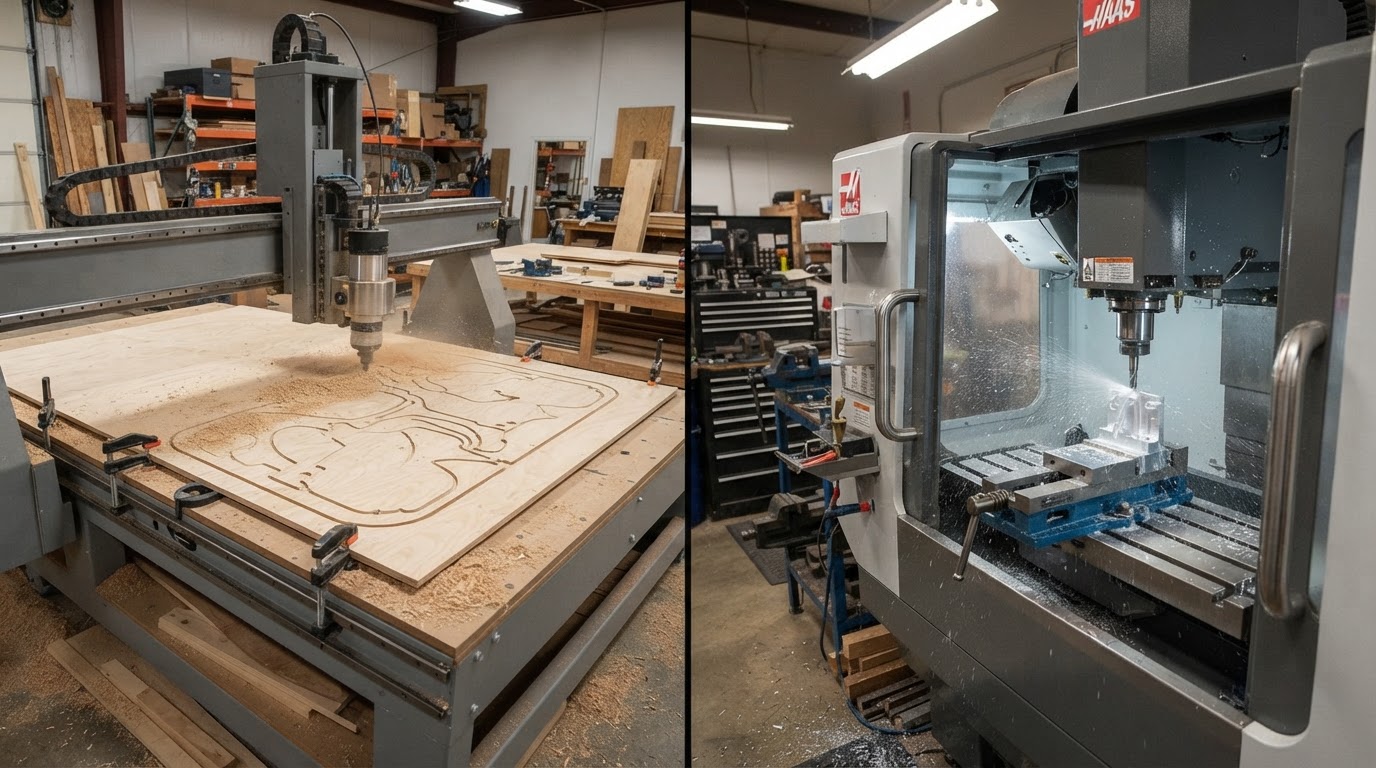
Quick answer
There is no universal winner. The right machine depends on your materials, part sizes, and the kind of cutting you do most. These are tendencies, not absolute definitions — machine architecture matters more than the label alone.
Lean toward a CNC router when your priorities include
- Woodworking — signs, furniture components, plywood and sheet goods
- Larger work area relative to machine cost
- Dimensional carving, V-carving, and decorative relief work
- Plastics and foam at larger sizes
- Aluminum on an appropriately rigid, capable machine
- Large flat parts relative to the machine's price
Lean toward a CNC mill when your priorities include
- Compact precision mechanical parts
- Demanding metal machining, including steel on capable machines
- Greater rigidity and heavier cutting loads
- Lower-speed, higher-torque cutting applications
- Harder materials and tighter machining requirements
- Deeper, heavier material removal and robust workholding
These lists overlap on purpose. A rigid router can be entirely adequate for moderate aluminum work, and a mill can machine wood and plastics. The machine's actual construction decides what it handles well — not the word on the front of it.
What actually makes a router different from a mill?
The useful distinction is not the label but the machine characteristics. Routers and mills are built around different compromises between work envelope, rigidity, spindle behavior, and cutting forces.
CNC router characteristics
- Often a gantry-style frame that moves the spindle over a fixed bed
- Larger X/Y work envelope for the cost
- Generally lower moving mass and lighter frame construction
- Higher spindle speeds suited to smaller tooling
- Workholding built around sheet goods — spoilboards, clamps, vacuum
- Optimized for wood, plastics, foam, and lighter machining
CNC mill characteristics
- Heavier, more rigid frame designed to resist greater cutting forces
- Smaller work envelope with more machine mass concentrated in it
- Spindle designed for torque at lower speeds and heavier cuts
- Workholding built around vises, fixture plates, and parallels
- Optimized for metal, including harder materials on capable machines
- Often a moving-column or knee-style architecture
CNC terminology gets blurry at the desktop level. A machine marketed as a "router" can be more rigid and capable than another machine marketed as a "mill." Evaluate the machine's frame, spindle, and motion system — not just its category name.
At-a-glance comparison
A quick orientation across the factors that most often drive the router-vs-mill decision. These describe typical machine classes, not absolute rules — individual machines vary widely.
| Factor | CNC router | CNC mill |
|---|---|---|
| Primary design emphasis | Large work area, lighter cuts | Rigidity, heavier cuts |
| Typical work area | Large, often sheet-sized | Compact, more mass per area |
| Machine rigidity | Generally lower | Generally higher |
| Typical spindle behavior | Higher speed, smaller tooling | Lower speed, more torque |
| Cutting forces | Lower | Higher |
| Wood | Excellent fit | Possible but often inefficient |
| Plywood / sheet goods | Excellent fit | Work envelope usually too small |
| Plastics | Good fit | Good fit |
| Aluminum | Possible on capable machines | Strong fit |
| Brass | Light work on capable machines | Strong fit |
| Steel | Generally poor fit for typical machines | Better suited on capable machines |
| Large parts | Strong advantage | Limited by envelope |
| Small mechanical parts | Possible | Strong fit |
| Deep pockets | Lighter passes, more time | Heavier cuts, better suited |
| 3D / relief carving | Common application | Possible but less typical |
| Sign making | Excellent fit | Possible but inefficient |
| Furniture / components | Excellent fit | Work envelope usually too small |
| Workholding | Spoilboard, clamps, vacuum | Vises, fixture plates, parallels |
| Chip management | Dust collection | Chip containment, coolant |
| Noise | Spindle/router noise | Machining noise |
| Typical workspace | Larger footprint, dust management | Smaller footprint, more mass |
| Best suited to | Wood, sheet goods, signs, large parts | Metal, compact precision parts |
"Possible" means a capable machine can do it with the right tooling and setup — not that every machine in that class does it well. Always qualify capability against the specific machine's rigidity, spindle, and tooling.
Rigidity — why it matters
Rigidity is the single most important factor separating a router-class machine from a mill-class machine, and it is the reason the two are not interchangeable.
During machining, cutting forces push against the tool, the spindle, the gantry or column, the machine frame, and the workpiece. Any of those components can deflect under load. Excess deflection shows up as chatter, poor surface finish, dimensional drift, accelerated tool wear, and a limited material-removal rate.
Mills are generally designed around resisting those forces. A heavier frame, stiffer linear motion, and a more massive spindle let a mill take heavier cuts in harder materials without deflecting enough to cause problems.
Router-style machines often trade some of that rigidity for a larger work area, lower cost per unit of work envelope, faster motion, and suitability for sheet goods and woodworking. That trade is sensible for wood and plastics, where cutting forces are lower — and it is exactly why routers struggle more than mills when cutting forces climb.
CNC router
- Lower frame mass and lighter construction favor speed and large envelopes
- Deflection becomes the limiting factor as cutting forces rise
- Heavier cuts in metal often require lighter, multiple passes
CNC mill
- Heavier frame and stiffer motion resist greater cutting forces
- Supports heavier cuts and harder materials with less chatter
- Concentrates mass into a smaller, more rigid work envelope
Rigidity is a continuum, not a binary. A well-built rigid router can outperform a loosely built mill within its intended applications. Compare actual machine construction, not category labels.
Spindle speed vs. torque
Spindle behavior is the second major difference, and it interacts directly with rigidity and tooling. Machining capability cannot be reduced to RPM alone.
CNC router
- Often higher spindle speeds suited to smaller-diameter tooling
- Well matched to wood, plastics, and aluminum with appropriate tooling
- Higher RPM helps smaller tools achieve correct cutting speed at the edge
CNC mill
- Designed to support larger tooling and heavier cuts
- Greater torque at lower spindle speeds for demanding metal machining
- Lower-speed torque helps maintain cut quality under heavy load
Spindle speed, torque, rigidity, tool diameter, chip load, and material all interact. A high-RPM spindle is not automatically "bad for metal," and a low-RPM spindle does not automatically mean more torque. The whole package — spindle, frame, tooling, and parameters — determines what a machine can do.
Work area
Work area is where routers often have a clear advantage for their cost, and it is one of the most practical decision factors.
CNC router
CNC routers commonly provide a much larger X/Y work envelope for the price. That suits signs, cabinetry, furniture components, panels, plywood, sheet goods, and large decorative projects — work that simply does not fit on a typical mill's table.
CNC mill
Mills concentrate more machine mass and rigidity into a smaller working envelope. The trade is size versus rigidity: you give up work area to gain stiffness and cutting capacity in harder materials. For compact precision parts that trade is exactly right; for a full sheet of plywood it is not.
This tradeoff does not apply identically to every machine. Some larger mills and some compact routers blur the envelope-versus-rigidity balance. Match the work area to the parts you actually intend to make.
Woodworking
CNC routers dominate most woodworking applications, and this is usually the clearest case for choosing a router over a mill.
- Signs and V-carved lettering
- Furniture components and cabinet parts
- Templates, jigs, and workshop fixtures
- Decorative relief and 3D carving
- Pockets, profiles, and sheet-goods work
- Large panels that need a big bed
A mill can machine wood, but its smaller work envelope and metal-focused architecture usually make it inefficient for typical woodworking projects. If wood is your primary material, a router is almost always the more natural fit.
Plastics
Plastics are a genuine overlap zone. Both routers and mills can machine plastic stock effectively when the setup is right.
What matters more than the machine label is tooling, feeds and speeds, chip evacuation, workholding, and heat management. Plastics can melt, weld to the tool, or chip poorly if parameters are wrong — on either machine.
Project size and the rigidity you need tend to drive the choice. A large acrylic panel favors a router's work area; a small precision plastic component with tight features may favor a mill's rigidity and workholding.
Don't choose based on the word "router" or "mill" alone. Choose based on part size, the rigidity the job needs, and the workholding that fits the part.
Aluminum — the overlap zone
Aluminum is where most buyers get confused, and it deserves a careful look. "Can a CNC router cut aluminum?" and "should I machine aluminum on a router?" are different questions.
CNC router
- A sufficiently rigid router can machine aluminum successfully
- "Can" does not mean every router is equally suited to aggressive removal
- Lighter, multiple passes are common on router-class machines
- Larger aluminum parts may favor a router's work area
- Rigidity, spindle, tooling, and chip evacuation all decide the outcome
CNC mill
- Better suited to heavier material removal and deep pockets
- Greater rigidity supports larger tooling and heavier cuts
- Workholding (vises, fixture plates) suits compact metal parts
- Lower-speed torque helps maintain cut quality under load
- Generally the more natural fit when aluminum is the primary material
A capable router can be entirely adequate for moderate aluminum work — brackets, plates, and occasional parts. When aluminum is your primary material, parts are compact, and you expect heavier machining, a mill usually becomes the more appropriate machine.
See our Best CNC Routers for Aluminum guide
Steel
Steel is where the router-vs-mill distinction becomes most important for the typical workshop buyer.
Typical hobby and prosumer CNC routers are generally not the first choice for serious steel machining. The cutting forces, rigidity, spindle characteristics, tooling, machine construction, and heat and chip management required for steel exceed what most router-class machines are built to handle comfortably.
A mill designed for metalworking is generally much better suited to steel. Its rigidity, torque, workholding, and enclosure are built around exactly those demands.
Specialized machines blur the categories — some rigid gantry systems can and do machine steel. But for the typical buyer comparing a desktop router against a desktop mill, steel work points clearly toward the mill.
This is guidance for the typical comparison, not an absolute claim about every machine that carries either label. Evaluate the specific machine's rigidity, spindle torque, and manufacturer-supported applications before assuming it can or cannot handle steel.
Brass and other nonferrous metals
Brass and similar nonferrous metals sit in the same overlap zone as aluminum, with the same caveats.
Capability depends on the machine, the tooling, the material, the rigidity, and the setup. A capable router can handle light brass work; a mill handles heavier brass machining more naturally.
As with aluminum, the deciding factors are how much material you need to remove, how compact the parts are, and how rigid the workholding needs to be.
Keep nonferrous machining qualified by machine capability, not by category label.
Accuracy, precision and repeatability
It is a mistake to say "mills are accurate and routers aren't." Both can produce accurate work within their intended applications — the question is what kind of accuracy you need.
CNC router
- A high-quality router can produce highly accurate work in its intended applications
- Accuracy depends on rigidity, linear motion quality, and calibration
- Cutting forces in wood and plastics are lower, so deflection is easier to manage
- Backlash, runout, and workholding still matter
CNC mill
- Architecture is better suited to demanding precision metal machining
- Heavier construction resists deflection under metal-cutting loads
- Tighter linear motion and workholding support tighter tolerances
- Thermal effects and cutting forces are managed more deliberately
Distinguish visual detail from dimensional accuracy. A router can produce fine visual detail in wood; a mill can hold tighter physical dimensions in metal. Those are different requirements, and neither machine is universally "more accurate."
Depth of cut and material removal
Depth of cut is where rigidity and spindle behavior show up most directly in the work you can do.
A rigid mill can generally tolerate heavier cutting loads, which means larger depths of cut and faster material removal in demanding materials. The frame and spindle are built to resist the forces that heavier cuts generate.
On router-style machines, heavier cuts in demanding materials often become multiple lighter passes instead. That is a practical workaround, not a defect — it is how router-class machines stay within their rigidity and spindle limits.
Depth of cut is not a single number you can look up. It depends on machine rigidity, tooling, spindle, material, chip load, and cutting strategy. No universal depth-of-cut value applies across machines.
Do not copy someone else's depth-of-cut setting. Work out parameters for your specific machine, tool, and material, and start conservative.
Tooling
The two machine classes overlap heavily on tooling, but each leans toward a different typical ecosystem.
CNC router tooling
- End mills and router bits
- V-bits for V-carving and lettering
- Engraving and surfacing bits
- Ball nose tools for relief carving
CNC mill tooling
- End mills and drills
- Face mills where the machine permits
- Chamfer and spot drill tools
- Specialty metalworking tooling
These categories are not mutually exclusive. End mills work on both machines; the difference is more about diameter range, shank size, and what the spindle and rigidity can drive effectively.
Workholding
Workholding follows directly from the parts and materials each machine is built for.
CNC router workholding
- Clamps and T-track on a spoilboard
- Vacuum hold-down for sheet goods
- Fixtures and tabs for repeatable parts
- Adhesive and tape methods where appropriate
CNC mill workholding
- Vises and parallels
- Fixture plates and purpose-built fixtures
- Clamps suited to compact metal parts
- Heavier workholding for heavier cutting forces
Cutting forces and project geometry drive workholding choice. A loose workpiece under a heavy cut is dangerous on either machine — match the holding method to the forces the job generates.
Coolant, lubrication and chip management
Metal machining changes what you need around the machine, and this is another area where mills and routers diverge in practice.
CNC router
Routers commonly use dust collection for wood and chip evacuation, with air blast or appropriate lubrication strategies for some metal applications. Full flood coolant is less common on router-class machines.
CNC mill
Mills more often support extensive coolant, mist or lubrication systems, chip containment, and enclosures designed for metal machining. The machine and its enclosure are built around managing chips and coolant.
Do not improvise coolant systems. Follow the machine manufacturer's guidance and use appropriate, safe lubrication and chip-management methods for your material and setup.
Noise and mess
Neither machine is clean or quiet. Plan for the mess each one makes.
CNC router
CNC routers produce spindle or router noise plus wood dust and chips. Dust collection is effectively mandatory, and routing can still be loud enough to need hearing protection and workspace planning.
CNC mill
CNC mills produce machining noise plus metal chips and, where applicable, coolant and lubricant. Cleanup, chip containment, and possible enclosure requirements are part of the workflow.
Neither process is inherently tidy or silent. Budget for dust or chip management and for the workspace each machine needs.
Workspace
The two machine classes occupy a workshop differently, and this can be a deciding factor before rigidity even comes into it.
CNC router workspace
- Often a larger footprint because of the work envelope
- Needs dust collection and space for sheet material access
- Noise and dust may require a dedicated or separated space
- Electrical considerations for spindle and dust collection
CNC mill workspace
- Smaller work envelope but greater machine mass
- Bench or floor requirements driven by weight and vibration
- Chip and coolant containment, possible enclosure needs
- Electrical considerations for spindle and coolant systems
Avoid machine-specific requirements unless you have verified them. Match the machine's footprint, weight, and mess profile to the space you actually have.
Software and workflow
Both machines generally follow the same conceptual workflow, but project complexity differs.
Both involve CAD design, CAM toolpath generation, setup, and machining. The fundamentals — tooling, workholding, zeroing, feeds and speeds, toolpaths, and material behavior — apply to both.
CAM becomes increasingly important as machining operations get more complex, and metal milling often demands more attention to cutting strategy, tool engagement, and chip evacuation than typical router work.
This is not a software roundup. The point is that the workflow is shared; the depth of process planning scales with how demanding the machining is, not with whether the machine is called a router or a mill.
Modern software has made both processes more accessible. Don't assume milling is inaccessible because it sounds more industrial.
Learning curve
Both machines require understanding the same core concepts. The difference is mostly in how much attention metal machining demands.
CNC router
- Tooling, workholding, zeroing, feeds and speeds, toolpaths
- Material behavior for wood, plastics, and sheet goods
- Dust management and workholding for larger parts
CNC mill
- The same core concepts, plus closer attention to cutting forces
- Tool engagement, chip evacuation, and workholding under load
- Heat management and process planning for metal
Milling is not inaccessible to beginners — it simply asks for more process planning when the material and cutting forces get serious. Start with simpler projects and grow on either machine.
Project-by-project decision table
A practical look at which machine class typically fits common projects. These are guidance, not universal machine specifications — capability always depends on the specific machine.
| Project | CNC router | CNC mill | Why |
|---|---|---|---|
| Plywood cabinet panel | Excellent | Poor fit | Sheet size favors a router's work envelope |
| Wooden sign | Excellent | Possible | Signs are a classic router application |
| V-carved sign | Excellent | Possible | V-carving is typical router work |
| Furniture component | Excellent | Poor fit | Size and material favor a router |
| Large decorative panel | Excellent | Poor fit | Work envelope is the deciding factor |
| Acrylic part | Good | Good | Overlap zone — size and rigidity decide |
| Plastic enclosure | Good | Good | Both handle plastics with the right setup |
| Aluminum bracket | Possible | Good | Light brackets suit a capable router; heavier work suits a mill |
| Aluminum fixture plate | Possible | Excellent | Flatness and heavier removal favor a mill |
| Small aluminum mechanical part | Possible | Excellent | Compact precision metal parts favor a mill |
| Brass component | Possible | Good | Nonferrous overlap — rigidity and workholding decide |
| Steel component | Poor fit | Better suited | Cutting forces and rigidity favor a mill |
| Deep metal pocket | Light passes only | Excellent | Heavier removal favors a mill's rigidity |
| Wood relief carving | Excellent | Possible | Relief carving is typical router work |
| Workshop jig | Excellent | Possible | Jigs and fixtures suit a router's size and speed |
| Precision mechanical component | Possible | Excellent | Tolerance and rigidity favor a mill |
"Possible" means a capable machine can do it with the right setup — not that it is the natural choice. Use this table to orient your thinking, then check the specific machine's capability.
When a CNC router is enough
A router may be all you need — and for many buyers it is the better choice. A router is likely enough when:
- Your projects are primarily wood and plastic
- Sheet goods and large flat parts matter
- Large work area is important for your parts
- Aluminum work is occasional or moderate and the machine is capable
- Signs, furniture, jigs, and decorative work dominate
- Heavy steel machining is not required
- Project geometry favors a large bed over maximum rigidity
If most of these describe your work, a router is likely the more practical and cost-effective choice. You do not need a mill just because the word sounds more capable.
When you actually need a mill
A mill becomes more compelling when your work pushes past what a router-class machine handles well. Consider a mill when:
- Metal is your primary material
- Steel is an important part of your work
- Parts are relatively compact
- Heavy material removal matters
- Rigidity is a higher priority than large work envelope
- Demanding mechanical parts dominate your projects
- Workholding and machining requirements exceed what a router comfortably supports
This is not about a mill being "better." It is about matching the machine's architecture to the forces, materials, and tolerances your work actually demands.
What if you mostly want to machine aluminum?
Aluminum deserves its own decision because it is the most common overlap question. The choice depends on part size, how much you machine, and how heavy the cuts are.
Choose a capable router when
- Larger aluminum parts or work area matter
- Machining is relatively light or moderate
- Wood and plastic capability also matters to you
- Budget and work envelope favor a router
Choose a mill when
- Aluminum is your primary material
- Parts are compact
- Heavier machining and deeper pockets are expected
- Rigidity matters more than large work envelope
- Mechanical machining dominates your work
See our Best CNC Routers for Aluminum guide
Beginner decision framework
Work through these questions before buying either machine. Your answers point toward the right architecture more reliably than any spec sheet.
Questions to work through
- What material will I machine most?
- How large are my parts?
- Do I need sheet-goods capability?
- Is woodworking important to me?
- Is aluminum occasional or my primary material?
- Do I need to machine steel?
- How demanding are my mechanical parts?
- Is large work area or rigidity more important to me?
- What workholding do my projects require?
- What workspace do I have — and can it handle dust or chips and coolant?
- What do I realistically plan to make during the first year?
Conditional recommendations
- Mostly wood, signs, and sheet goods: A CNC router is almost certainly the right starting point — larger work area and lower cost suit this work.
- Mostly compact metal parts, including steel: A mill is the more natural fit — rigidity, torque, and workholding suit metal machining.
- Mostly aluminum, occasional parts: A capable, rigid router can handle moderate aluminum work and gives you wood and plastic capability too.
- Mostly aluminum, heavier or repeated machining: A mill is usually the better long-term fit when aluminum is primary and parts are compact.
- Mixed wood, plastic, and light metal: A rigid router covers the widest range; add a mill later if metal work grows beyond what it handles well.
- Not sure what I want to make yet: Define your projects before buying either machine. The right choice depends entirely on what you intend to make.
Don't buy based on the label alone
"Router" and "mill" are useful categories, but they are not specifications. The machine itself matters more than the marketing label.
- Frame rigidity and construction
- Spindle characteristics and torque curve
- Linear motion system quality
- Work envelope and Z travel
- Workholding options the machine supports
- Tooling the spindle can actually drive
- Manufacturer-supported materials and applications
When comparing two specific machines, evaluate these factors directly. A rigid machine called a "router" can outperform a loosely built machine called a "mill" within its intended work.
Related digital fabrication comparisons
If you are weighing other tools alongside a CNC machine, these comparisons cover the broader decision.
- Laser Cutter vs. CNC Router — Light-based, non-contact cutting versus physical subtractive routing — materials, depth, detail, and where each process wins.
- CNC Router vs. 3D Printer — Subtractive routing versus additive printing — materials, geometry, strength, waste, and which process fits the parts you want to make.
Frequently Asked Questions
Keep reading
- Best CNC Routers
- Best CNC Routers for Aluminum
- Desktop CNC Routers for Beginners
- How Much Does a CNC Router Cost?
- CNC Routers hub
- Laser Cutter vs. CNC Router
- CNC Router vs. 3D Printer
Digital Workshop Guide does not claim hands-on testing or ownership of equipment unless explicitly stated. This comparison is based on the documented principles of subtractive machining, machine construction, and general process fundamentals — not on independent rigidity measurements, spindle torque figures, material-removal rates, or cutting-speed benchmarks. Machine-specific capability depends on rigidity, spindle, tooling, material, and setup.