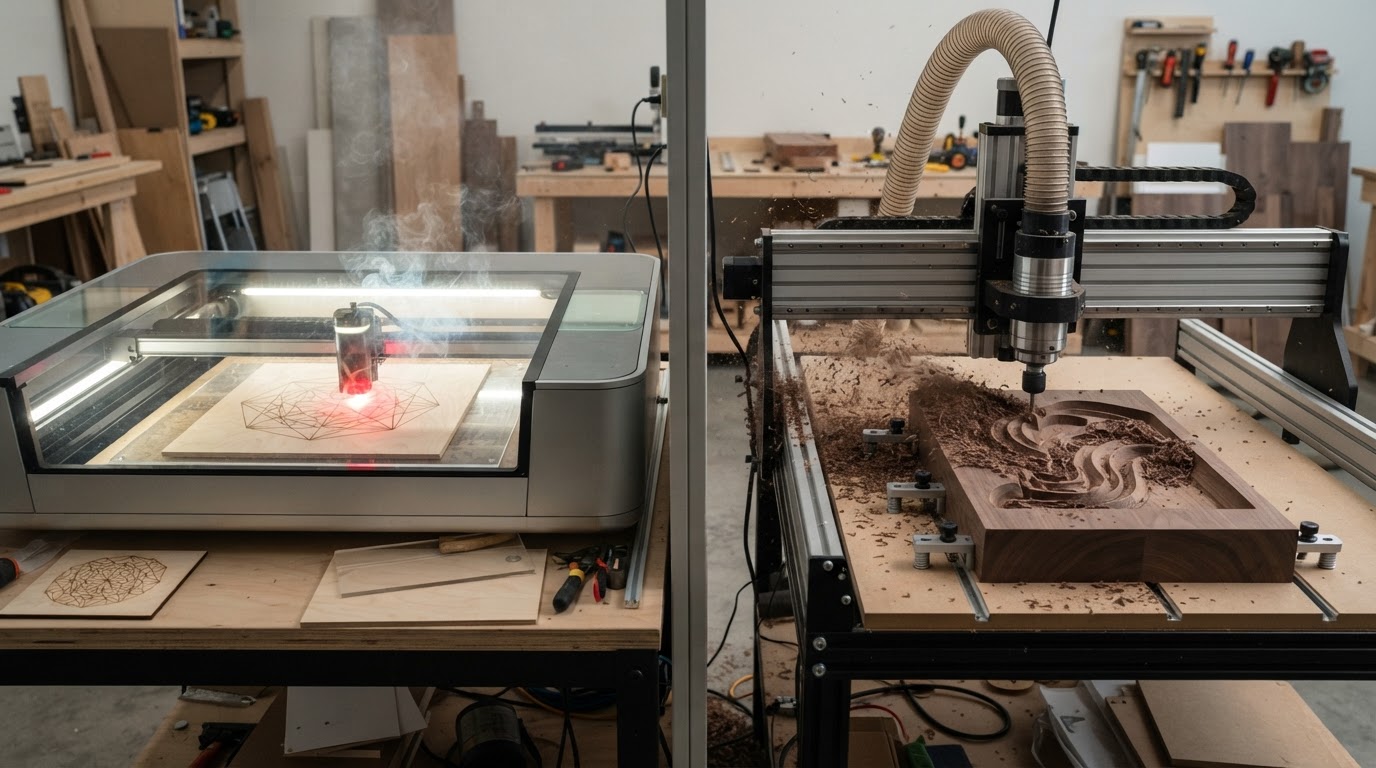
Laser vs. CNC comparison
Laser Cutter vs. CNC Router: Which One Should You Choose?
Laser cutters and CNC routers both turn a digital design into a physical part, and they overlap on plenty of projects — signs, decorative work, sheet goods, and small-business products. That overlap is exactly why the choice is hard.
But they remove material in completely different ways. A laser uses concentrated light and heat to cut, engrave, or mark. A CNC router uses a spinning cutting tool to physically carve material away. That single difference cascades into everything that follows: which materials you can use, how thick you can go, how much detail you get, what kind of edges and surfaces result, and what your workshop needs to handle.
This guide is not about which machine is better. It's about which process is better for the things you actually want to make — and for the space, budget, and learning curve you're willing to take on.
Quick answer
There's no universal winner. The right choice depends on whether your work leans toward fine surface detail and thin-sheet cutting, or toward depth, pockets, and dimensional parts.
Lean toward a laser cutter if your priorities are more like:
- Fine engraving, detailed graphics, and text
- Thin sheet cutting of wood, acrylic, paper, and leather
- Signs, personalization, and custom graphics
- Intricate 2D shapes and internal cutouts
- Non-contact processing with no cutting-tool pressure
- Fast switching between engraving and cutting on the same part
Lean toward a CNC router if your priorities are more like:
- Deeper material removal and thicker stock
- Pockets, slots, and recessed features
- Dimensional parts and 2.5D/3D carving
- Joinery, furniture components, and cabinetry parts
- Machining materials that many desktop lasers can't process
- Controlled physical dimensions and depth
Neither list is absolute. Capability depends on laser type and power, machine rigidity and spindle, tooling, workholding, and the specific material and geometry of your project.
At a glance: laser cutter vs. CNC router
A high-level comparison of the two processes. Every row is qualified — real capability depends on the specific machine, laser type, tooling, and setup.
| Factor | Laser cutter | CNC router |
|---|---|---|
| Process | Focused light/heat removes or marks material | Spinning cutting tool physically removes material |
| Primary operation | Engraving and 2D cutting | Cutting, carving, pocketing, profiling |
| Typical geometry | Primarily 2D / 2.5D surface and through-cuts | 2D, 2.5D, and 3D relief |
| Engraving detail | Excellent for fine graphics and surface detail | Good for V-carving and recessed lettering |
| Deep carving | Limited — mostly surface marking | Strong — pockets, reliefs, and depth |
| Thicker stock | Limited by power; thin to moderate sheet | Strong — handles thicker material |
| Wood | Cuts and engraves; charred edges | Cuts and carves; tool marks on edges |
| Acrylic | CO2 cuts cleanly with flame-polished edges | Machinable; needs workholding and chip control |
| Aluminum | Desktop diode/CO2 generally can't cut it; fiber marks it | Machinable on a rigid machine with proper tooling |
| Tool contact | Non-contact | Physical cutting forces |
| Tooling / consumables | Optics, lenses, air-assist consumables | Bits, end mills, collets, spoilboards |
| Dust | Minimal — mostly smoke and residue | Significant chips and fine dust |
| Fumes / smoke | Major consideration — ventilation required | Minimal smoke; dust is the main concern |
| Noise | Generally quieter cutting | Spindle/router and cutting can be loud |
| Workholding | Often minimal — material lies flat | Essential — clamps, tabs, vacuum, fixtures |
| Learning considerations | Settings, focus, materials, ventilation | CAD/CAM, tooling, feeds/speeds, workholding |
| Maintenance | Optics, alignment, ventilation, bed cleaning | Bits, collets, rails, spoilboard, dust system |
| Workspace considerations | Ventilation and enclosure are central | Dust collection, noise, and rigidity matter |
| Best suited to | Graphics, personalization, thin-sheet work | Dimensional parts, joinery, carving |
“Laser” is not one technology — diode, CO2, and fiber systems have very different material capabilities. “CNC router” capability also varies enormously by rigidity, spindle, and tooling. Treat the table as a starting point, not a verdict.
How the two processes work
Understanding the basic mechanism explains almost every difference that follows.
Laser cutter
A laser cutter focuses a beam of light into a small spot, concentrating enough energy to burn, melt, vaporize, or mark material. Depending on the laser type, wavelength, power, and the material, the result is a cut through the sheet, an engraving on the surface, or a mark on a coating.
Because nothing physically touches the workpiece, there are no cutting forces to resist. That's why a laser can produce extremely fine detail and intricate internal geometry that a spinning bit can't reach.
- No cutting-tool contact — no cutting forces on the material
- Kerf is the width of the beam, allowing very fine detail
- Heat-affected edges — wood chars, acrylic can flame-polish
- Fine 2D detail and sharp internal corners are achievable
- Focus height must be set correctly for the material
- Ventilation is required for smoke and fumes
CNC router
A CNC router moves a rotating cutting tool — a bit or end mill — along programmed toolpaths, physically removing material as chips. The spindle or router turns the bit; the machine moves it through the work in X, Y, and Z.
Because the tool pushes against the material, the workpiece must be held firmly and the machine must be rigid enough to resist cutting forces. That's the source of both the CNC's strength (controlled depth and dimensional parts) and its demands (workholding, rigidity, dust).
- Cutting forces require solid workholding
- Tool diameter sets the minimum inside-corner radius and kerf
- Feeds and speeds must match the material and bit
- Material is removed as chips and dust
- Depth of cut is controlled — pockets and 3D relief are possible
- Multi-pass machining handles thicker stock
The non-contact vs. contact distinction is the root of nearly every other difference: detail, depth, edge finish, workholding, noise, and the kind of mess each machine makes.
Laser types matter — a lot
Saying “a laser can cut X” without identifying the laser technology is misleading. The three common types interact with materials very differently.
- Diode: Blue diode lasers are the affordable desktop entry point. They engrave and cut wood, leather, paper, and many coated materials, but generally can't cut clear acrylic or mark bare metal.
- CO2: CO2 lasers cut and engrave a wider range, including clear and colored acrylic, wood, leather, and paper. They cost more and take more space, and still don't mark bare metal.
- Fiber: Fiber lasers (1064nm) are primarily relevant to metal marking and engraving. They're the technology bare metal actually absorbs, and they cost more with typically smaller work areas.
Throughout this guide, “laser” capability is qualified by type. A capability that's true for a CO2 laser may be false for a diode, and vice versa.
Read the full Types of Laser Engravers guide
Wood: laser vs. CNC
Wood is where the two processes overlap most — and where the differences are easiest to feel.
Laser on wood
- Excels at intricate 2D cuts and surface engraving
- Fine detail, sharp internal corners, and delicate ornaments
- Edges are cut by heat — plywood and MDF can char or leave a darkened kerf
- Surface engraving produces clean, detailed graphics and text
- Limited to thin-to-moderate sheet thickness depending on power
- No cutting forces, so thin or fragile stock stays put
CNC on wood
- Excels when depth, pockets, profiles, or joinery matter
- Cuts thicker stock and creates dimensional carving and relief
- Pockets, slots, rabbets, and dadoes are routine
- Edges show tool marks rather than charring
- Inside corners are limited by bit diameter (rounded internal corners)
- Workholding is required — the tool pushes against the wood
For a detailed wooden sign with fine graphics, a laser often wins. For a dimensional carved sign, a tray with pockets, or a furniture component with joinery, a CNC is the better fit. Avoid universal thickness claims — what's “thin” depends on the laser's power and the wood's density.
Acrylic
Acrylic is a material where laser type and CNC setup both matter a great deal.
Laser on acrylic
- CO2 lasers cut acrylic cleanly with a flame-polished, glossy edge
- Clear acrylic generally requires a CO2 laser — diodes typically can't cut it
- Engraving produces a frosted surface on cast acrylic
- Cast acrylic engraves and cuts more cleanly than extruded
- Wavelength matters: diode light passes through clear acrylic rather than absorbing
CNC on acrylic
- Machinable with the right bit, feeds, and speeds
- Edges need finishing — they won't flame-polish like a laser cut
- Workholding is essential to prevent cracking and chatter
- Chips must be managed; acrylic can melt rather than cut cleanly if speeds are wrong
- Suitable for dimensional features a laser can't create
Don't assume all lasers cut all acrylic equally. A diode generally can't cut clear acrylic; a CO2 does it beautifully. On the CNC side, acrylic demands careful feeds and workholding to avoid melting or cracking.
Aluminum and metals
This section needs care. Sweeping claims like “lasers can't work with metal” are wrong, but they're also misleading without context.
Fiber lasers and industrial metal-cutting systems absolutely exist and are purpose-built for metal. A fiber laser can mark, engrave, and (at sufficient power) cut metal. That's a different class of machine from a typical desktop diode or CO2 laser.
For the typical workshop buyer comparing a consumer or prosumer laser with a CNC router, the practical distinction is this: a desktop diode or CO2 laser generally can't cut aluminum, and can only mark bare metal with a marking agent or a fiber-capable system. A CNC router, on a sufficiently rigid machine with the right bits, slow speeds, light cuts, and often coolant, can machine aluminum.
So in the consumer/prosumer comparison, metal removal generally leans CNC — but only on a machine built for it. A light desktop router will struggle with aluminum regardless of process.
Read the Best CNC Routers for Aluminum guide
Other materials
Beyond wood, acrylic, and metal, both processes handle a range of other materials — with important safety caveats.
- Leather: Lasers engrave and cut leather well; CNC can machine it but it's uncommon.
- Plastics: Many plastics cut or engrave on a laser; CNC machines them with appropriate tooling. Material-specific behavior varies widely.
- Foam: CNC routs foam for packaging and prototypes; lasers can cut some foams but melting and fumes are concerns.
- Composites: CNC handles composite sheet well; lasers depend on the matrix and resin — some composites are unsafe to laser-cut.
- Laminates: Lasers cut and engrave laminates cleanly; CNC profiles them with the right bit.
- Coated materials: Lasers can remove coatings to mark the substrate; verify the coating is safe to process before cutting.
Do not casually laser-process unknown plastics. Some materials — notably PVC and vinyl — release hazardous, corrosive fumes (including chlorine compounds) when cut by a laser and can damage equipment and harm the operator. Always confirm a material is safe and appropriate for laser processing before you run it. When in doubt, don't.
Engraving
“Engraving” means substantially different results depending on the process.
Laser engraving
- Fine graphics, text, and detailed surface imagery
- Photographs and halftones (where the material and laser suit it)
- Surface detail and personalization at small scale
- Consistent depth controlled by power and speed settings
- No tool pressure, so delicate or thin materials survive
CNC engraving
- V-carving with angled bits for crisp lettering that widens with depth
- Recessed and dimensional lettering with real physical depth
- Deeper engraving than a typical surface laser pass
- Inlay work where a recessed pocket accepts an inlay piece
- Results depend on bit geometry and CAM strategy
Laser engraving is usually the choice for fine graphics and personalization. CNC engraving is the choice when you want physical depth, V-carved lettering, or inlay pockets.
Cutting
Cutting workflows differ in ways that affect what geometry you can produce.
Laser cutting
- Kerf is the beam width — very fine and consistent
- Heat affects edges; wood chars, acrylic flame-polishes
- Intricate geometry and sharp internal corners are achievable
- Sheet work is the natural fit
- No tabs needed — the material isn't pushed
CNC cutting
- Bit diameter sets the kerf and the minimum inside-corner radius
- Tabs hold parts in place once cut free
- Workholding is required to resist cutting forces
- Multiple passes handle thicker stock
- Inside corners are rounded (limited by bit radius)
Geometry matters. A design with sharp internal corners and delicate filigree favors a laser. A design that needs thick stock, tabs, and dimensional profiles favors a CNC.
3D carving and depth
This is a clear CNC advantage. A conventional laser cutter/engraver is primarily a 2D/2.5D surface and cutting process.
- Pockets and recessed cavities
- Contours and relief carving from a 3D model
- Stepped features and Z-axis depth control
- Joinery — rabbets, dados, mortises, and tenons
- Dimensional surfaces and sculpted forms
A laser can do light surface relief with multiple passes, but it does not replace CNC machining for true dimensional material removal. If your work depends on depth, a CNC router is the right tool.
Precision vs. detail
Avoid declaring one technology universally “more precise.” Precision and detail are different requirements.
Laser
- Creates extremely fine visual detail and small features
- Positioning accuracy depends on the motion system and focus
- Kerf is tiny and consistent
- No tool deflection — no cutting forces to bend the tool
CNC
- Creates highly controlled physical dimensions and depths
- Accuracy depends on machine rigidity, backlash, and tooling
- Tool diameter limits the smallest feature and inside corner
- Cutting forces can deflect a bit on a less rigid machine
A laser may create finer visual detail; a CNC may create more controlled physical dimensions and depth. Those aren't the same requirement — know which one your project actually needs.
Speed
Don't accept a blanket claim that one is faster. Speed depends heavily on the job and the machine.
- Surface engraving: A laser is often fast for surface graphics and text, especially across a large flat area.
- Intricate thin-sheet cutting: A laser can follow delicate paths quickly with no tool changes.
- Deep material removal: A CNC removes real volume; deep pockets take multiple passes and time.
- Large pockets: CNC pocketing is bounded by bit size, stepover, and depth per pass.
- Repeated parts: Both can batch parts; CNC may need re-zeroing or workholding changes between setups.
- Tool changes: CNC may require bit changes between operations; a laser typically doesn't change “tools.”
For fine surface work, a laser often feels faster. For deep or dimensional work, a CNC is doing a job a laser can't, so speed isn't the comparison — capability is.
Workspace
Real ownership requirements differ, and your space may decide the question for you.
Laser workspace
- Ventilation and exhaust are central — smoke and fumes must leave the room or be filtered
- An enclosure contains light and debris but doesn't make exhaust optional
- Fire awareness matters — a laser is an ignition source
- Air assist helps manage charring and flare risk
- Generally less cutting-tool noise than a CNC
CNC workspace
- Dust collection is essential — routing makes a lot of chips and fine dust
- Spindle/router and cutting noise can be significant
- Workholding takes space and planning (clamps, tabs, vacuum)
- Physical debris needs management
- Rigidity needs a solid mounting surface
Someone in an apartment or spare room may find a small enclosed laser with good ventilation more workable than a dusty, noisy CNC. Someone in a garage or dedicated workshop has more room for either — and for the dust and noise a CNC brings. Neither process is inherently safe indoors without appropriate controls.
Noise, dust, and fumes
A direct comparison of the two biggest environmental tradeoffs.
Laser
Typically less cutting-tool noise, but ventilation and smoke/fume management are major considerations. Cutting and engraving produce smoke, odor, and residue that must be exhausted or filtered.
CNC
Significant mechanical and spindle noise plus chips and fine dust. Dust collection is essential, and noise control matters if you share walls with neighbors.
If you can't manage fumes, a laser is hard to live with. If you can't manage dust and noise, a CNC is hard to live with. Match the machine to what your space can actually handle.
Learning curve
Both have a learning curve, but the shape of it differs.
Laser workflow
- Design or import your artwork
- Set power, speed, and passes for the material
- Set focus and place the material
- Run the cut or engrave
CNC workflow
- Design the part in CAD or vector software
- Generate toolpaths in CAM (tools, feeds, speeds, depth)
- Select and install the right bit
- Secure the workpiece and set zero
- Run the toolpath and supervise the cut
CNC isn't impossibly complicated — modern software has made both processes more accessible. But CNC does introduce a more explicit CAD/CAM/toolpath workflow and more setup variables (tooling, workholding, feeds and speeds) than a typical laser job.
Software
The workflows differ in structure without this being a software roundup.
Laser
Laser software often combines design/import and machine control in one tool. Manufacturer apps match their hardware; LightBurn and LaserGRBL are popular third-party options. The path from artwork to cut is usually short.
CNC
CNC usually introduces a more explicit CAD → CAM → control workflow. You design the part, generate toolpaths in CAM, and send g-code to the machine. The extra step (CAM) is where tooling, feeds, speeds, and depth strategy are defined.
Confirm what a machine supports before buying — not every machine works with every package. Workflow fit matters as much as feature count.
Maintenance
Typical maintenance categories — not universal schedules.
Laser maintenance
- Optics — keep lenses and windows clean
- Alignment (on architectures that require it)
- Ventilation paths and exhaust
- Bed and work area cleaning
- Cooling on systems that use it
CNC maintenance
- Bits and end mills — inspect and replace
- Collets and tool holders
- Spoilboard — surface or replace
- Rails, leadscrews, and motion system
- Dust collection and spindle/router
- General machine cleaning and lubrication
Ongoing costs
Ownership cost categories — not fabricated annual figures.
Laser ongoing costs
- Consumable optics where applicable
- Replacement parts (tubes, modules) over the machine's life
- Ventilation filters depending on your setup
- Material
- Routine maintenance
CNC ongoing costs
- Bits and end mills (consumable tooling)
- Spoilboards
- Workholding and clamping
- Dust collection consumables (bags, filters)
- Material
- Routine maintenance
Sticker price alone is misleading. A cheap machine that needs constant troubleshooting can cost more in time and replacement parts than a more capable one. The same is true in reverse — price doesn't automatically equal reliability.
Small business use
Both processes support real business models — but different ones.
Laser-friendly business models
- Personalization and custom engraving
- Signs and ornaments
- Engraved products, gifts, and awards
- Custom graphics and batch personalization
- Decorative products from sheet goods
CNC-friendly business models
- Dimensional and carved signs
- Furniture components and cabinetry parts
- Dimensional lettering and V-carved products
- Jigs, fixtures, and templates
- Larger or thicker components
Market demand and your production workflow matter more than simply owning the machine. The right process is the one that matches what your customers actually buy.
Read the Best Laser Engravers for Small Business guide
Project-by-project decision table
A practical lens: for each common project, which process is the better fit and why. These are general guidance, not absolute machine specifications.
| Project | Laser | CNC router | Why |
|---|---|---|---|
| Detailed wooden sign (fine graphics) | Excellent | Possible | Fine surface detail and sharp corners favor a laser. |
| Dimensional carved sign | Poor fit | Excellent | Depth and relief carving require a CNC. |
| Acrylic lettering | Excellent (CO2) | Good | CO2 cuts acrylic with a clean, polished edge. |
| Custom cutting board engraving | Excellent | Good | Surface graphics and personalization favor a laser. |
| Furniture component | Poor fit | Excellent | Pockets, profiles, and joinery need a CNC. |
| Cabinet template | Possible | Excellent | Accurate, durable templates are a CNC strength. |
| Wooden puzzle | Excellent | Good | Intricate 2D cuts with fine kerf favor a laser. |
| Intricate plywood ornament | Excellent | Possible | Delicate filigree and sharp corners favor a laser. |
| Pocketed wooden tray | Poor fit | Excellent | Pockets and recessed cavities require a CNC. |
| Aluminum bracket | Poor fit (desktop) | Good (rigid machine) | Metal removal generally requires a capable CNC. |
| V-carved sign | Poor fit | Excellent | V-carving with angled bits is a CNC capability. |
| Photo engraving | Good (material-dependent) | Poor fit | Halftone surface imagery favors a laser. |
| Custom jig | Possible | Excellent | Dimensional accuracy and pockets favor a CNC. |
| Prototype enclosure | Good | Good | Either can work; geometry and material decide. |
| Decorative wall panel | Good | Good | Surface detail leans laser; relief leans CNC. |
“Excellent,” “Good,” “Possible,” and “Poor fit” are general guidance, not guarantees. Real results depend on the specific machine, laser type, tooling, material, and setup.
What do you want to make?
Organized by goal. Match your primary projects to the process that serves them.
- Personalized products — lean Laser. Fine surface graphics, text, and batch personalization are a laser strength.
- Intricate 2D cutting — lean Laser. Fine kerf, sharp corners, and delicate geometry favor a laser.
- Deep carving — lean CNC. Pockets, reliefs, and real depth require a CNC.
- Furniture / joinery — lean CNC. Pockets, rabbets, dados, and dimensional parts are CNC work.
- Metal machining — lean CNC (with caveats). In the consumer/prosumer comparison, metal removal generally needs a capable CNC; fiber lasers are a different class.
- Surface graphics — lean Laser. Engraving fine detail on a flat surface is a laser's home turf.
- Dimensional parts — lean CNC. Controlled depth and 3D form require a CNC.
- Mixed maker projects — lean Depends. Material and geometry decide; many makers eventually want both.
When you may eventually want both
Laser cutters and CNC routers can complement each other rather than compete.
A maker might CNC-machine a wooden product — carving a sign, cutting a furniture part, or pocketing a tray — and then laser engrave branding, a serial number, artwork, or personalization onto the finished piece. The two processes do different jobs on the same object.
Or a laser-cut template or fixture can support other fabrication workflows — accurate jigs, stencils, or alignment aids that make hand work or CNC setup faster and more repeatable.
Examples
- CNC-carve a sign, then laser-engrave fine detail and branding onto it
- Laser-cut a precise template, then use it to guide CNC or hand routing
- CNC-machine a product body, then laser-mark a serial or logo
- Laser-cut inlay pieces, then CNC-pocket the recesses that accept them
This doesn't mean everyone needs both. But if your work spans dimensional parts and fine surface graphics, the two tools cover ground the other can't.
Should you buy a laser or a CNC first?
A practical decision framework. Work through these questions honestly before choosing.
Questions to work through
- What material will I use most?
- Do I need depth, or mostly surface and through-cuts?
- How thick are my typical materials?
- Do I need fine graphics and text?
- Do I need pockets, joinery, or dimensional parts?
- What workspace do I have — and can it handle fumes or dust?
- Can I manage ventilation for a laser?
- Can I manage noise and dust for a CNC?
- Do I want a CAD/CAM machining workflow?
- What products or projects do I realistically intend to make?
Conditional recommendations
- Mostly fine graphics, personalization, and thin-sheet cutting: A laser — ideally matched to your materials (CO2 if clear acrylic is in the mix).
- Mostly depth, pockets, joinery, and dimensional parts: A CNC router sized to your typical part and rigidity needs.
- Mostly wood signs with fine detail: A laser for graphics; a CNC only if you want dimensional carving.
- Mostly acrylic signage: A CO2 laser for clean, polished cuts.
- Mostly aluminum or metal: A rigid, capable CNC — and verify it's built for soft-metal work.
- A mix of both, with budget for one: Start with whichever covers more of your realistic project list; add the other later.
Cost comparison
Compare cost categories rather than chasing a fake exact equivalence. Sticker price alone is misleading.
- Machine purchase: Both span a wide range — from inexpensive desktop machines to capable prosumer and production systems.
- Accessories: Lasers need ventilation, air assist, and possibly an enclosure; CNCs need workholding, bits, and a spoilboard.
- Ventilation vs. dust collection: Lasers need exhaust or filtration; CNCs need dust collection. Both are real, ongoing infrastructure costs.
- Tooling: Lasers consume optics over time; CNCs consume bits, end mills, and spoilboards.
- Software: Some software is included; pro packages (LightBurn, CAM tools) add cost. Confirm what's bundled.
- Workholding: A CNC needs clamps, tabs, or a vacuum system; a laser often needs little beyond a flat bed.
- Maintenance: Both need routine upkeep — optics and alignment for lasers; motion system, collets, and dust system for CNCs.
- Consumables: Material is the shared ongoing cost; each process adds its own consumables (optics vs. tooling).
The cheapest machine isn't necessarily the least expensive ownership experience if it requires substantially more troubleshooting. But price doesn't automatically equal reliability either — evaluate the specific machine.
Read the How Much Does a CNC Router Cost? guide
Frequently Asked Questions
Keep reading
- Types of Laser Engravers: Diode vs CO2 vs Fiber
- How Much Laser Power Do You Actually Need?
- Best Laser Engravers for Small Business
- Best Laser Engravers for Wood
- Best Laser Engravers for Beginners
- Laser Engraving hub
- CNC Routers hub
- How Much Does a CNC Router Cost?
- Best CNC Routers
- Best CNC Routers for Aluminum
- Desktop CNC Routers for Beginners
Digital Workshop Guide does not claim hands-on testing or ownership of equipment unless explicitly stated. This comparison is based on the documented principles of laser and CNC machining, manufacturer specifications, and general process fundamentals — not on independent performance measurements, production-speed benchmarks, or survey results. Machine-specific capability depends on laser type, machine rigidity, tooling, and setup.